
Camera RAW Recovery
Recover CR2, CR3, NEF, ARW, ORF, RW2, RAF, and DNG from SD cards, camera media, and drives.
Written by the Refindo Recovery Team · Updated
Lose a shoot and the RAW files are almost always still on the card, not gone. A card reformatted in the camera, a folder deleted after a bad import, a card that suddenly asks to be formatted in a reader. Refindo scans the card or drive for camera RAW formats, reads the preview baked into each shot so you can see it before you commit, and writes the recovered files to a separate drive so the originals are never overwritten.
What this covers
- Recover Canon CR2/CR3, Nikon NEF, Sony ARW, Olympus ORF, Panasonic RW2, Fujifilm RAF, and Adobe DNG
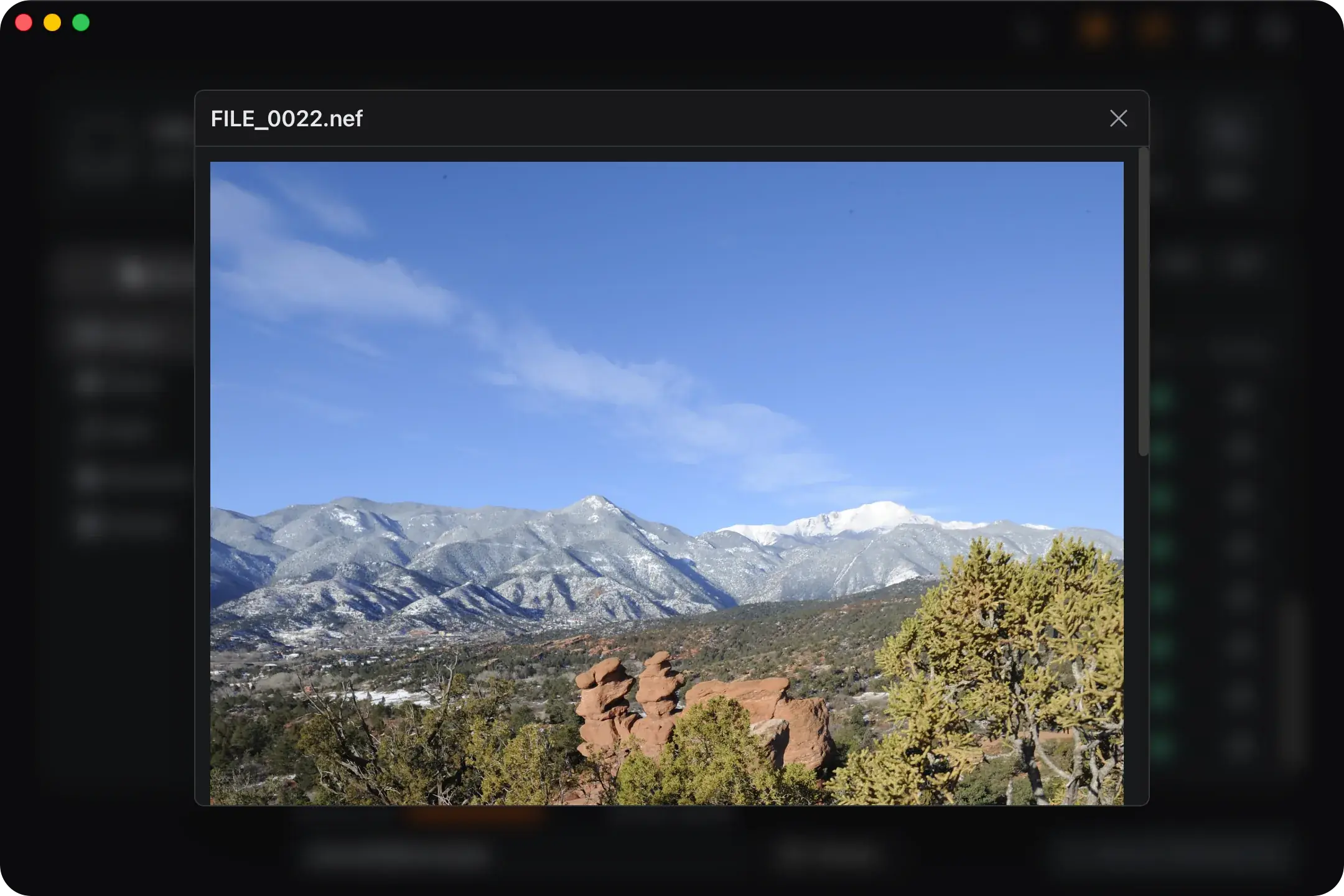
- Preview RAW shots full-size from each file's embedded JPEG, no Lightroom or external viewer needed
- Works with SD and microSD cards, camera media read over USB, and external drives
- Quick Scan for a recent delete, Deep Scan to rebuild RAW after a format
- Recover to a different drive so the source card is never written to
- Scan and preview for free, with 500 MB of free recovery before any payment
Learn the Recovery Limits First
Recovery Workflow
- Take the card out of the camera and stop shooting to it as soon as files go missing.
- Read the card through a card reader rather than the camera's USB, then select it in Refindo.
- Run Quick Scan first, then Deep Scan if the card was formatted or the shots are missing.
- Filter to the image types, preview the RAW frames, and confirm the ones that matter.
- Recover the selected RAW files to a different drive, never back to the source card.
- Open the results in Lightroom, Capture One, or the maker software to check they are whole.
Best Practices
- Don't shoot another frame on the card first; cameras reuse freed space quickly.
- Use a dedicated card reader so a long Deep Scan keeps a steady connection.
- Trust the preview over the file list, especially for large RAW that can fragment.
- Recover into an empty folder, verify a few frames, then import into your catalog.
- Keep the recovery destination on a separate drive with room to spare.
What makes RAW different from a JPEG scan
A RAW file is not one thing. It bundles the camera's sensor data together with a full-size JPEG preview, some metadata, and a thumbnail, all in a container that varies by manufacturer. Canon writes CR2 and the newer CR3, Nikon writes NEF, Sony ARW, Olympus ORF, Panasonic RW2, Fujifilm RAF, and Adobe DNG is the common format many cameras and converters share. Refindo recognises each one by its content signature, not its name, so a carved file still gets the right extension even after the original file name is gone.
That embedded preview is the part that makes RAW recovery practical. Because every RAW carries a JPEG of the shot near the front of the file, Refindo can show you the picture without decoding the sensor data, which is slow and format-specific. You get to see what a file actually is before recovering it, the same way you preview an ordinary photo. The flip side is size: a single RAW can run from 15 MB to well over 60 MB, which matters for how they fragment.
- CR2, CR3, NEF, ARW, ORF, RW2, RAF, and DNG are detected by content, not file name.
- Each RAW carries an embedded JPEG, which is what the preview reads.
- RAW files are large, often the biggest files on a card.
- Deep Scan rebuilds RAW by signature when the folders are gone.
The RAW formats Refindo recovers, brand by brand
The format on the card depends on the camera, and Refindo handles the ones photographers actually shoot. Canon bodies write CR2 on older DSLRs and CR3 on the newer mirrorless lineup, Nikon writes NEF, Sony writes ARW, Olympus and OM System write ORF, Panasonic Lumix writes RW2, and Fujifilm writes RAF. Adobe DNG sits across all of them, the open format some cameras shoot directly and a lot of photographers convert to for archiving. Every one of these is found by reading its signature off the media, so a Canon CR3 comes back as a CR3 and a Sony ARW as an ARW even when the original file name is gone.
The recovery itself doesn't change much from one brand to the next, but a couple of details are worth knowing. CR3 is built on the same ISO container as the HEIC and MP4 a modern phone shoots, so Refindo reads its real structure instead of guessing at the size. Panasonic RW2 is the awkward one, since it doesn't store its own length in a way carving can read; on a deep scan its size is worked out from where the raw data begins and where the next file starts. The practical result is that all seven formats recover and all seven preview, and the cleanest results come from a card that hasn't been shot to since the files went missing.
- Canon CR2 and CR3, including CR3 from recent mirrorless bodies
- Nikon NEF and Sony ARW from DSLR and mirrorless cameras
- Olympus and OM System ORF, Panasonic Lumix RW2, and Fujifilm RAF
- Adobe DNG, the open RAW format shared across brands and converters
Why a large RAW can come back only partly
When the card's directory is intact, a RAW file comes back whole because the file system still knows exactly where it begins and ends. The harder case is a card that was filled, partly cleared, and shot to again. A big RAW can end up split across separated areas of the card, and once the file is deleted the record of where those pieces live can be lost. Recovery then follows the first run cleanly and may not find the rest, so the file opens but the later part is wrong.
There's a small mercy built into the format. The embedded JPEG preview sits near the start of the file, so it usually survives even when the full-resolution sensor data did not all come back. That means you can still see the shot, recover the preview, and know what you lost, even in the cases where the complete RAW could not be reassembled. The honest way to sort the clean recoveries from the partial ones is to preview the frames you care about and check their file size before you restore a whole card.
- A RAW stored in one continuous run recovers cleanly.
- Filled-and-cleared cards fragment large RAW files, which complicates carving.
- A deleted fragmented RAW may recover only its first run.
- The embedded preview usually opens even when the full file did not.
Camera RAW Recovery Guidance
Match the scan to what happened
A recent delete on a card that still mounts normally is a Quick Scan job: the file system records often survive, names and folders can come back, and it finishes fast. A formatted card, a card that reads as RAW in the operating system, or a set of shots that simply do not appear is a Deep Scan job, because the directory is gone and the files have to be rebuilt from their signatures. Run Quick Scan first either way, since it costs nothing and sometimes finds everything, then fall back to Deep Scan when it comes up short.
Read the preview, not the file list
On a deep scan of a reused card you'll see more candidates than you shot: partial files, duplicate previews, and the occasional false start all show up. For RAW the preview is the deciding signal. Open the frames you actually care about, confirm they render full-size rather than as a cropped or half-corrupt image, and glance at the file size against what a normal RAW from that camera weighs. A few seconds per important shot saves you from recovering a folder of files that won't open in your editor.
Verify in your editor before clearing the card
Don't reformat or reuse the source card on the strength of the file list alone. Recover the RAW files to a plain folder on another drive, open a sample in Lightroom, Capture One, or the camera maker's app, and confirm they develop normally. Only once the shots you needed are confirmed should you put the card back into rotation. If anything important is still missing or partial, the card is your last copy, so leave it alone and scan again rather than writing to it.
Frequently Asked Questions
Which camera RAW formats can Refindo recover?
Refindo recovers Canon CR2 and CR3, Nikon NEF, Sony ARW, Olympus ORF, Panasonic RW2, Fujifilm RAF, and Adobe DNG, alongside standard photo formats like JPG, HEIC, and TIFF.
Can I preview a RAW photo before recovering it?
Yes. Every camera RAW file carries an embedded JPEG preview, and Refindo reads that to show the shot full-size before recovery, so you do not need Lightroom or a separate viewer just to see what a file is.
Can RAW files be recovered from a formatted SD card?
Often yes. After a quick format the RAW data usually stays on the card until new shots overwrite it. Quick Scan has little to read once the folders are gone, so Deep Scan rebuilds the RAW files by their content signature.
Why did a recovered RAW file only come back partly?
Large RAW files are frequently fragmented on a card that was filled, cleared, and refilled. Once a file is deleted, the map of those fragments can be lost, so recovery follows the first run and the later part may be missing. The embedded preview usually still opens because it sits near the front of the file. Check the preview and file size before trusting a whole batch.
Do recovered RAW files keep their original names?
Quick Scan can keep original names and folders when the file system records survive. Deep Scan rebuilds files from their signatures, so it assigns generic names like FILE_0007.cr2 with the correct extension, but the original camera name is not recoverable.
Are recovered RAW files still editable?
A RAW file that comes back intact opens and edits normally in Lightroom, Capture One, or the camera maker software. Verify the important frames in your editor before deleting anything from the source card.
Can Refindo recover a corrupted or unreadable RAW file?
If the RAW data is still intact on the media, recovery brings the file back and it opens normally. If part of the file was overwritten or the card is failing, a recovered RAW can come back partial, which usually shows as a clean preview but an error when you develop it. Preview and file size are the fastest way to tell a clean recovery from a partial one before you rely on it.
Start with a free scan
Check recoverable files first, then decide whether to proceed with recovery, and save results to a separate drive.