
SD Card Recovery
Recover photos and videos from deleted, formatted, RAW, or unrecognized cards.
Written by the Refindo Recovery Team · Updated
SD card recovery is time-sensitive because cameras, drones, and computers can quickly overwrite deleted media. Refindo helps scan detectable FAT32 and exFAT cards that were deleted, formatted, turned RAW, appear empty, are not recognized, or ask to be formatted. Preview photos and videos first, then recover selected files to another destination.
Quick answer
Photos and videos deleted, formatted, or lost to a RAW or unrecognized SD card can usually be recovered if the card is still detectable. It's time-sensitive, so stop shooting, take the card out, and scan it before a camera or computer overwrites the freed space.
What this covers
- For SD cards that are deleted, formatted, RAW, not recognized, empty, or asking to format
- Supports common SD card file systems: FAT32 and exFAT
- Recover photos, camera videos, documents, and media files from detectable cards
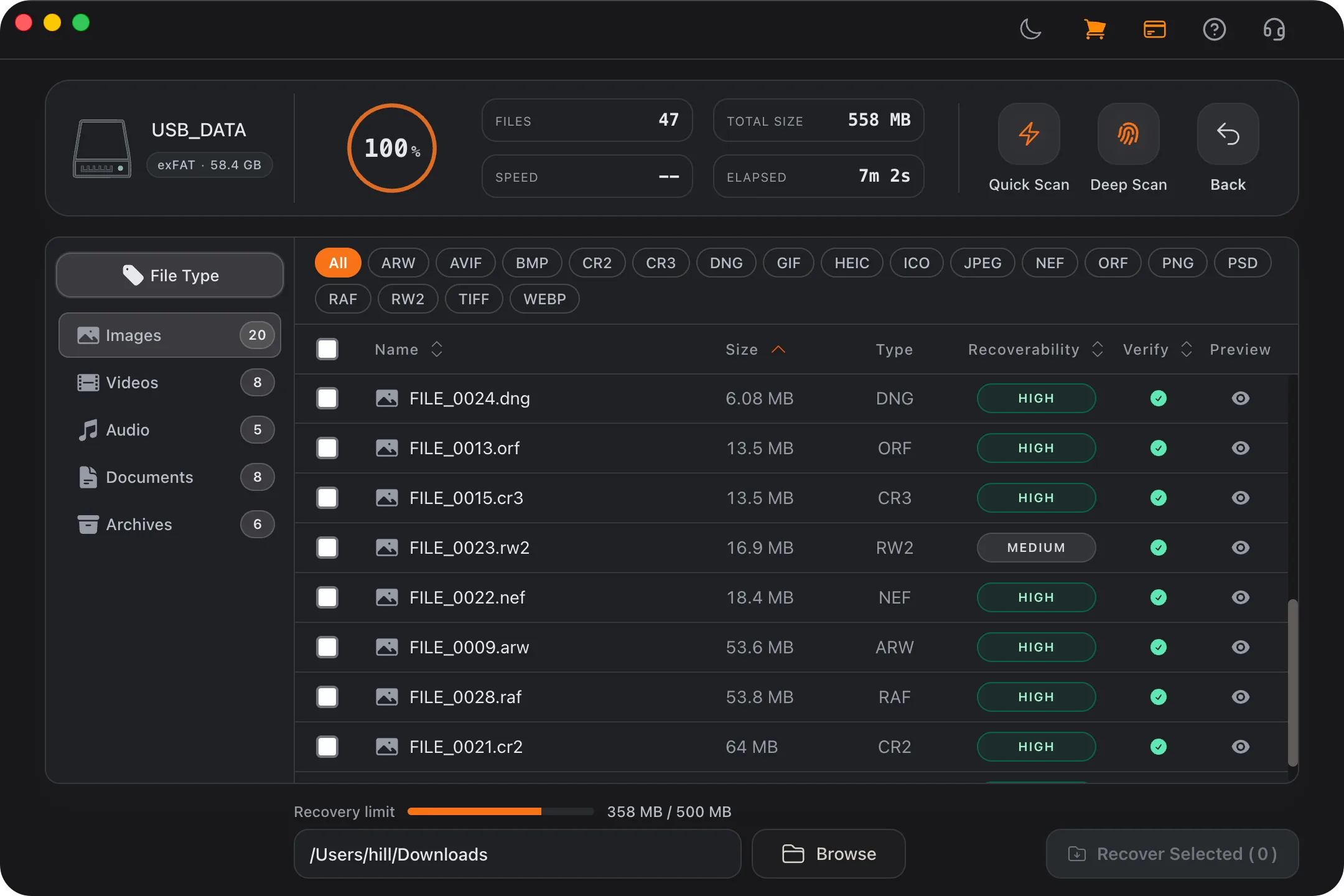
- Quick Scan for remaining metadata and Deep Scan when folders are gone
- Preview before recovery to reduce guesswork
Learn the Recovery Limits First
Recovery Workflow
- Stop using the SD card and do not take new photos or videos.
- Insert the card through a reliable reader and confirm it shows the correct capacity.
- Run Quick Scan and review initial results.
- Use Deep Scan when the card is RAW, formatted, empty, or missing key folders.
- Preview important photos and videos, then recover selected files to another disk.
Best Practices
- Stop using the SD card immediately after data loss.
- Do not shoot new photos/videos before recovery.
- Use a reliable card reader and stable connection.
- Recover to another drive, then verify recovered files.
Why camera cards are a race against the next shot
SD and microSD cards live in cameras, drones, action cams, and audio recorders, which makes their data loss unusually time-sensitive: the same device that lost the files is ready to overwrite them with the next photo or clip. A card that was nearly full when you deleted a shot has very little free space, so even a few new frames can land right on the data you want back. The first and most important thing to do is just stop shooting and take the card out of the device.
Camera media also leans on Deep Scan more than ordinary drives do. When the FAT32 or exFAT directory is gone, JPEGs, RAW-style image files, and video get rebuilt from their file signatures. That works well for photos but is harder for long video, because a single clip can be split across many non-adjacent areas of the card, and any interruption leaves a gap. Reading the card through a dedicated card reader, rather than tethering the camera over USB, gives you the steadier connection long scans need.
- Stop recording right away, since the next shot can overwrite a deleted one.
- Deleted photos and video often need Deep Scan once folder records are gone.
- Long video is the hardest to recover cleanly because of fragmentation.
- A dedicated card reader is steadier than scanning through the camera.
Format prompts, RAW cards, and cards that look empty
A card that suddenly asks to be formatted, shows up as RAW, or displays empty folders has almost always suffered damage to its FAT32 or exFAT metadata, not to the photos and videos themselves. The media is usually still sitting on the flash, readable, as long as the card reports its correct capacity when you insert it. That capacity is the key signal: a card showing its real size is a strong recovery candidate.
The wrong response is to accept the format prompt or let the computer "repair" the card, since both write over the structures a scan reads. Cancel, scan first, and recover what matters before you reformat the card for reuse. If instead the card shows the wrong capacity, throws I/O errors, or drops out repeatedly, that points to physical or controller failure, where a recovery lab is a safer bet than another scan.
- Cancel format prompts and scan before reformatting the card.
- A correct reported capacity is the best sign the media is recoverable.
- Wrong capacity, I/O errors, or dropouts point to hardware failure.
- Skip "repair this card" prompts until after the recovery scan.
SD Card Recovery Guidance
The card stays out of the camera until you are done
Everything about SD card recovery comes back to one rule: new writes are the enemy. Putting the card back in the camera to "just check," letting a phone re-index it, or shooting one test frame can all overwrite deleted media, and on a card that was close to full when you lost the files, there's barely any spare room for new data to land anywhere else. Pull the card, keep it out, and only put it back once everything you wanted is recovered and verified on another drive.
A reliable reader is part of the recovery
Cards fail to recover for boring reasons as often as dramatic ones: a flaky card reader, a worn slot, a camera that drops the USB connection mid-scan. A good standalone reader plugged straight into the computer gives a far steadier read than tethering through the camera or drone. If a scan stalls or the card disappears partway through, swap the reader or the port before you decide the data is gone. The flash is often fine and the link was the problem.
Preview the big clips before you trust them
Photos tend to recover whole or not at all, but long video is the genuinely tricky case: a 4K clip spans a large, often fragmented region of the card, and if any piece got overwritten the file may not play cleanly even when it shows up in the results. Use the preview and a quick file-size sanity check to spot the clips most likely to be intact, and recover and test those first. It's much better to confirm your key footage plays than to restore a hundred files and find out later that the one that mattered is corrupt.
Frequently Asked Questions
Can I recover deleted photos from an SD card?
Yes. If the card is still detectable and data has not been heavily overwritten, scan and preview can help identify recoverable photos.
Can I recover an SD card that says it needs formatting?
Often, yes, if the card is still detectable with the correct capacity. Cancel the format prompt and scan before formatting or repair.
Does SD card recovery support video files too?
Yes. Refindo can scan for recoverable videos and documents in addition to photos on supported SD card file systems.
What should I do first after SD card file loss?
Stop using the card immediately and run a scan as soon as possible. Avoid taking new photos before recovery.
Can a RAW SD card be recovered?
A RAW SD card may still contain recoverable files when the card is detectable and readable. Do not format or run repair tools before scanning.
Should I recover files back to the same SD card?
No. Save recovered files to your computer or another drive, never back to the SD card being scanned.
Start with a free scan
Check recoverable files first, then decide whether to proceed with recovery, and save results to a separate drive.